23/07/24 Unity Mlagents 환경 세팅 중 두 가지 오류가 발생해서 하루종일 끙끙대다 마침내 해결한 부분을 공유하려 합니다.
https://github.com/Unity-Technologies/ml-agents/blob/release_19/docs/Installation.md
ml-agents/docs/Installation.md at release_19 · Unity-Technologies/ml-agents
The Unity Machine Learning Agents Toolkit (ML-Agents) is an open-source project that enables games and simulations to serve as environments for training intelligent agents using deep reinforcement ...
github.com
https://github.com/Unity-Technologies/ml-agents/blob/release_19/docs/Using-Virtual-Environment.md
ml-agents/docs/Using-Virtual-Environment.md at release_19 · Unity-Technologies/ml-agents
The Unity Machine Learning Agents Toolkit (ML-Agents) is an open-source project that enables games and simulations to serve as environments for training intelligent agents using deep reinforcement ...
github.com
기본적으로는 해당 자료들을 참고했습니다.
버전은 다음과 같습니다.
- ml-agents: 0.28.0 (realease_19)
- ml-agents-envs: 0.28.0
- Communicator API: 1.5.0
- PyTorch: 1.8.1
- Python: 3.7.0
영상을 따라하면서 mlagents-learn --help까지 정상적으로 실행되는걸 확인했고, mlagent 폴더 내에 있는 Project 예제도 유니티에서 플레이 잘 되는 것을 확인했습니다.
그러나
mlagents-learn "예제 yaml 경로" --run-id="아무이름"
명령어를 터미널에서 실행 시켰을때 아래의 에러들이 발생했습니다.
1. AttributeError: 'str' object has no attribute '_key'

https://github.com/Unity-Technologies/ml-agents/issues/5794
해당 경로에서는 라이브러리 문제로 인해 파이썬과 연결되지 않는 것이 원인이라고 합니다.
pip install importlib-metadata==4.4
명령어를 사용해 업데이트 후에 실행하니 해결됐습니다.
2. Couldn't connect to trainer on port 5004 using API version 1.5.0. Will perform inference instead. (유니티에서의 오류)


그러나 터미널에서 열린 5004번 서버에는 플레이 버튼을 눌러도 연결되지 않고 결국 타임아웃으로 해당 오류가 발생했습니다.
구글링을 좀 해보니 gRpc를 최신 버전으로 업데이트를 하고 코드를 좀 수정해야한다고 하는데, 코드도 처음부터 싹 다 수정해야하고 유니티에서 제공한 Project 예제인데 이게 설정 안되어있을것 같진 않았슴..
https://forum.unity.com/threads/couldnt-connect-to-trainer-on-port-5004-using-api-version-1-5-0-will-perform-inference-instead.1396912/
해당 사이트에선 grpc 관련 이야기는 하지 않았고 서버에 연결하는 bundle 파일 문제를 얘기했다. 사이트에 나와있는 해결방법은
1. 먼저 Project 창에서 해당 경로에 Grpc.Core가 있는지 확인
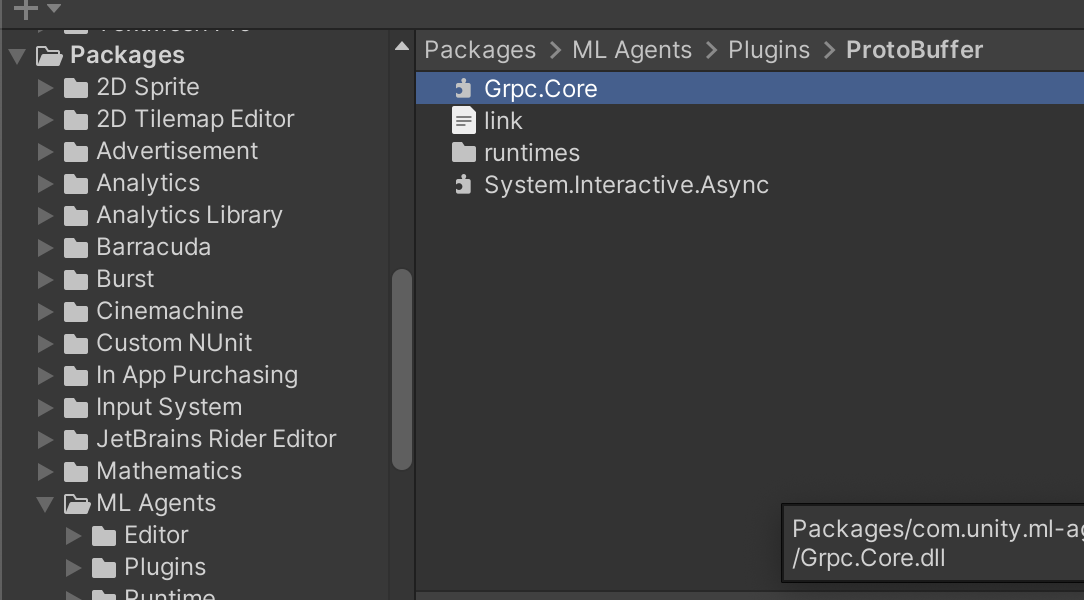
2. 있다면 아까의 경로에서 runtimes/osx/native로 더 들어가서 libgrpc_csharp_ext.x64.bundle 파일 확인, 빨간색 체크한 부분을 모두 클릭해보고
OS가 macOS,
CPU가 Apple Sillicon
인지 확인하고 그렇게 되어있다면 Apply 버튼을 누르고 재실행

도 해봤는데 나는 또 안됐다..
근데 유니티에서 실행할때마다

와 같은 애플 경고 메시지가 뜨고있었고 bundle 파일 자체가 실행 안되고 있다는걸 이제야 확인했다 에효 (무지성 확인 버튼누르기;)
그래서 맥 시스템 설정 > 개인정보 보호 및 보안에 들어가서 중간에 bundle 파일이 실행 차단되어있는걸 허용해주니까 됐다 ㅠㅠ
교훈 2723162313128트 : 무작정 구글링하지말고 오류메시지부터 보자..